As part of the product development process at NBS, we listen carefully to customer feedback and feature enhancements that can complement and improve established internal design processes.
A set of shared parameters has been identified and developed that allows designers to provide additional information on drawing outputs, for the purposes of further identification and descriptive notation. The features of this ‘enhanced integration’ are introduced below.
Object association
The new BIM Library in NBS Source has tens of thousands of high-quality Revit® layered and component families that are free to download. Using the NBS Plug-in for Autodesk® Revit®, these objects can be downloaded from NBS directly into your design and quickly associated to NBS Chorus.
Depending upon the object type, the integration process will differ slightly:
- Layered objects
Example families include wall, floor and ceiling objects. The nature of these objects requires two levels of association, first at object type and then the constituent materials. - Component objects
Example families include door and sanitaryware objects. Only type association is required.
Figure 1 - Associating layered objects
Multiple objects and types can be associated to the same clause in NBS Chorus. Equally, once a Revit® type has been associated, all other instances of that type are linked.
Enhanced shared parameters
The enhanced functionality in the NBS Plug-in for Autodesk® Revit® enables the synchronization of crucial information from NBS Chorus to modelled objects. These shared parameters can be easily integrated into your drawing annotations and schedules to provide further clarity on product identification.
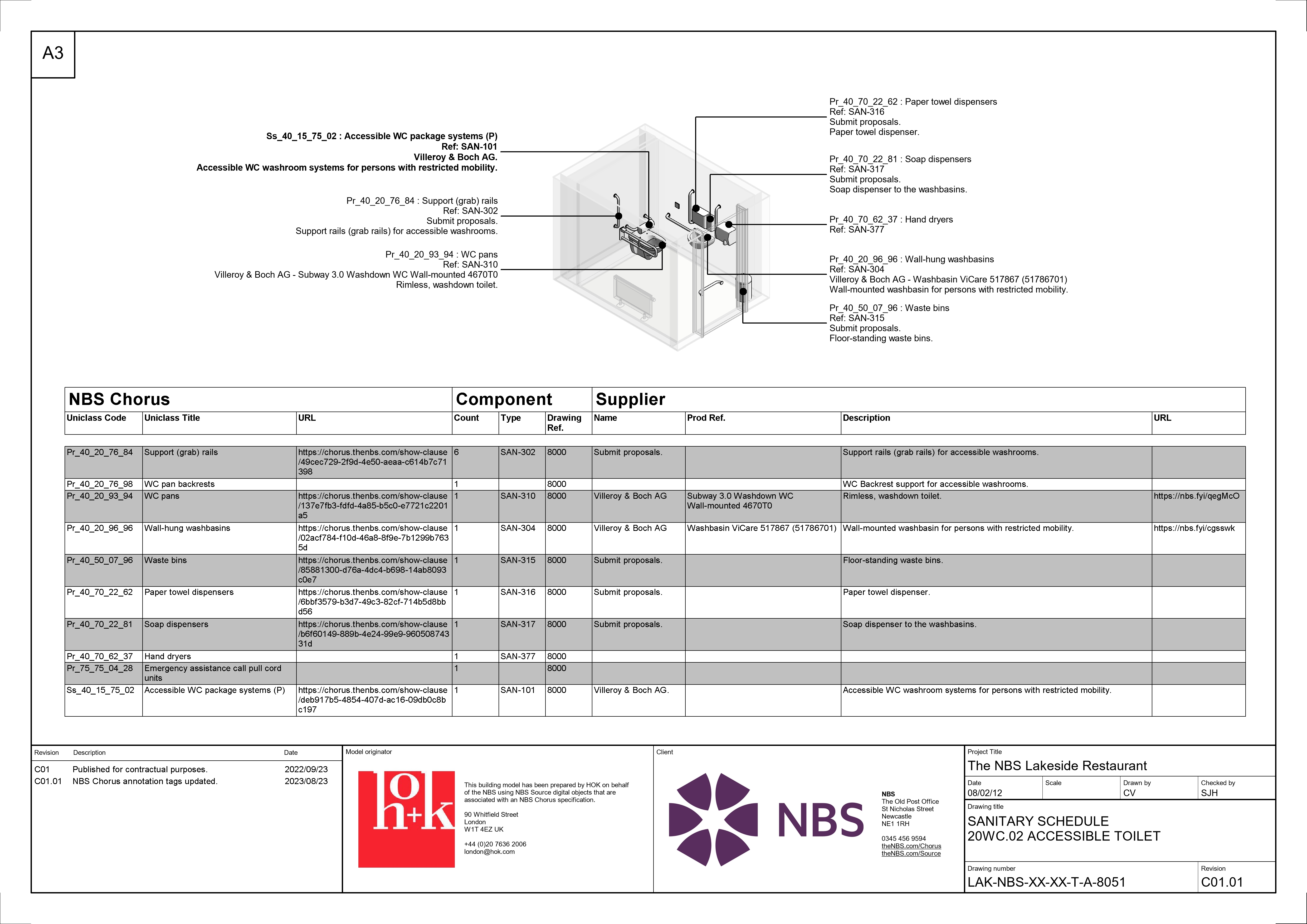 Figure 2 - Example coordinated room schedule
Parameters are automatically embedded into the model and their applicable object(s) at the point of association and are summarized in Table 1 below.
| Property name1 | Type | Description |
| NBSChorusCategory | Text | Clause number and title. |
| NBSChorusClauseID | Text | Read-only property. Clause identification in NBS Chorus. |
| NBSChorusCode | Text | Classification system number. |
| NBSChorusDescription | Text | Clause description in NBS Chorus. |
| NBSChorusManName | Text | Manufacturer identification. |
| NBSChorusManProdURL | URL | Link to NBS Source product page. |
| NBSChorusPrefix | Text | Custom clause prefix field. |
| NBSChorusProdRef | Text | Product identification as per manufacturer information. |
| NBSChorusProjectID | Text | Read-only property. Project identification in NBS Chorus. |
| NBSChorusSpecificationId | Text | Read-only property. Specification identification in NBS Chorus. |
| NBSChorusSuffix | Text | Custom clause suffix field. |
| NBSChorusURL | URL | Link to overall specification. |
Table 1 - NBS specification parameters
NOTE1: Equivalent shared properties are available with a “_mrtrl” suffix for Revit® materials.
The information is authored and controlled within NBS Chorus and automatically synchronized with the model, which speeds up processes and reduces the risk of information not being coordinated. Where information has been updated within NBS Chorus, warnings and error messages are displayed on the model tab notifying the user that the two are out of sync and that corrective action is required.
Figure 3 - Fixing information that is out of sync
NBS annotation tags for Autodesk® Revit®
NBS has several different annotation families appropriate for regional differences and applicable content sets in NBS Chorus:
- CAWS tags for specifications based on the UK CAWS content sets.
- OmniClass tags for specifications based on the Canadian CMS and NMS content sets.
- Uniclass tags for specifications based on the Australian and UK Uniclass content sets.
The default tags can be found in the NBS tab as shown in Figure 4 below. Alternatively, they can be found in the following locations once the NBS Plug-in for Autodesk® Revit® is installed:
Revit® 2023 onwards
C:\ProgramData\Autodesk\ApplicationPlugins\NBS.bundle\Contents\Revit2023\Redistributables\tags\NBS Chorus
Revit® 2020–2022
C:\ProgramData\Autodesk\ApplicationPlugins\NBS.bundle\Contents\Revit2020-2022\Redistributables\Tags\NBS Chorus
The latest NBS Shared Parmeter file contains all the necessary parameters to create custom annotation tags.
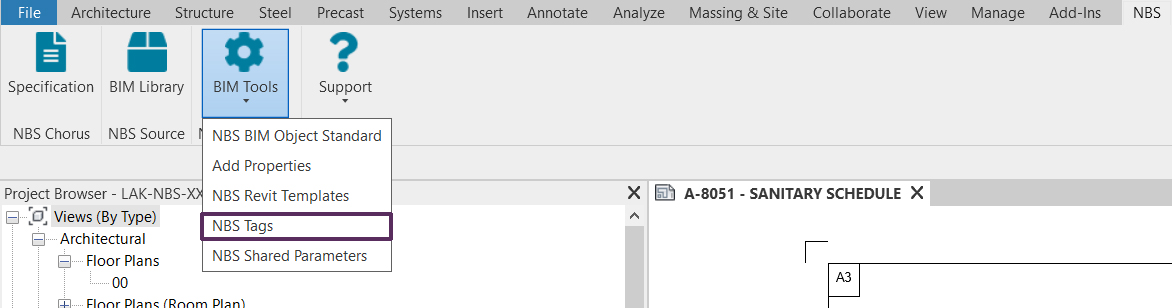 Figure 4 - NBS annotation location via the NBS Plug-in for Autodesk® Revit® interface
Sample BIM tools
Access the example NBS files used to demonstrate interoperability.