Here you will find all you need to know about updates and support for NBS Plug-in for Autodesk® Revit®
Issue
When you sign into the NBS Plugin for Autodesk Revit with your NBS account, your username and password are not recognised.
Cause
Your username and password are incorrect or the plug-in cannot authenticate them with the NBS licence server.
Resolution
- [Important] First check you have the latest version of the NBS plug-in installed. Run the plug-in diagnostics to check by clicking on the Support menu > About > Diagnostics > Run tests. If necessary, please download the latest version from Downloads And Updates.
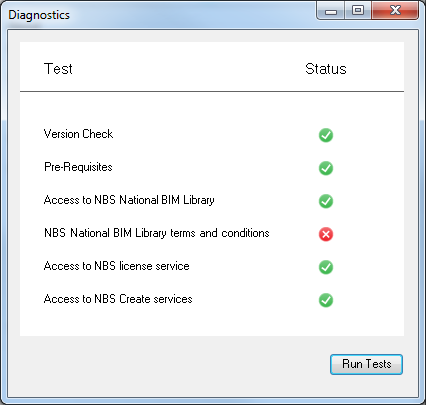
If any of the tests fail, hover over the ‘cross’ for more information.
- Confirm your username and password are correct. Check this by logging into this website (My NBS at the top of the page). If you can log in successfully your login details are not the cause of the issue.
Reasons for failure:
Version Check
You have an old version of the NBS Plug-in installed. Download and install the latest version.
Pre-Requisites
You do not have the pre-requisite software installed. Please refer to the installation instructions.
Access to NBS National BIM Library
The plug-in must be permitted to access the NBS network though your proxy/firewall. Please refer to the installation instructions.NBS National BIM Library terms and conditions
To download objects from the National BIM Library you must agree to the terms and conditions. To do this:
- In Autodesk Revit click on the NBS menu.
- Select Download BIM Object.
- Click to download an object.
- Sign in with your NBS user account.
- Agree to the terms and conditions.
Access to NBS licence service and Access to NBS Create Services
This test will fail for two reasons.
- The date, time and location settings on your PC are set incorrectly. Check they are set correctly in Control Panel.
- The plug-in must be permitted to access the NBS network though your proxy/firewall. Please refer to the installation instructions.
After checking these steps above, try signing in to the NBS Plugin for Autodesk Revit again.