Why my object is orientated against the wrong plane

Dec 10, 2015 |NBS Software Support

This content is no longer up to date and has been archived.

You may wish to consider searching for newer content

Issue

When you add a National BIM Library object into your Autodesk Revit model it comes in at the wrong orientation. It may be inverted by 90 degrees and attached to the wrong plain.

Example

Add 'ASH_ArmitageShanks_DocMPacks_CCLeftHandPack_S6966 S6966MY - Contour 21 Close coupled Doc M pack LH Stainless' to the model it comes in inverted by 90 degrees. So the back of the toilet is on its side rather than fixed to the wall.
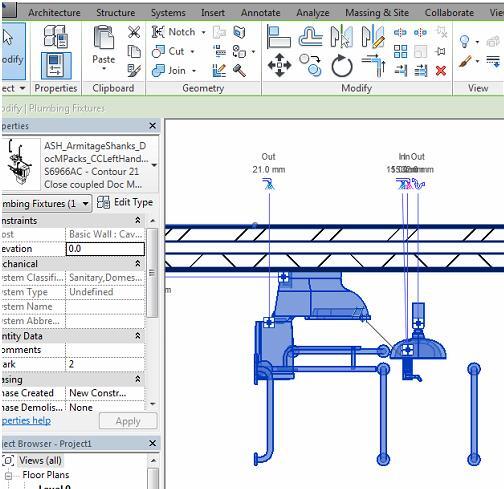
Plugin PL0004_1

Solution

The Autodesk Revit Family has been authored as a face based component with the bottom of the component being the hosting face.  Please select “Place on Face” prior to placing the Family in your project, then place ensuring the floor is selected as the host.
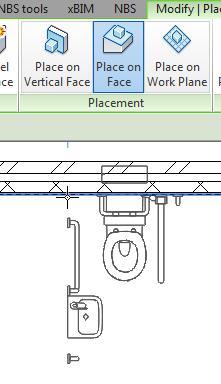
Plugin PL0004_2

Latest articles

Here you will find all you need to know about updates and support for NBS Plug-in for Autodesk® Revit®

How to do a clean reinstall of the NBS Plugin for Autodesk Revit

Occasionally a normal reinstall of the NBS Plugin for Autodesk Revit will not effectively resolve the issue at hand, resulting in a clean reinstall to be required instead.

How to access Specification Features in the NBS Plugin for Autodesk Revit (v3.6)

Summary Within the NBS Plugin for Autodesk Revit, you have the ability to access features that allow you to link your Revit model and NBS Specification files.

How to access Specification Features in the NBS Plugin for Autodesk Revit (v3.5)

Summary Within the NBS Plugin for Autodesk Revit, you have the ability to access features that allow you to link your Revit model and NBS Specification files.