Change NBS Contract Administrator Datastore

Sep 8, 2015 |NBS Software Support

Summary

To change the Datastore location (the CAFtab.cadb) in NBS Contract Administrator, click on Tools > Options and select the File Locations tab.
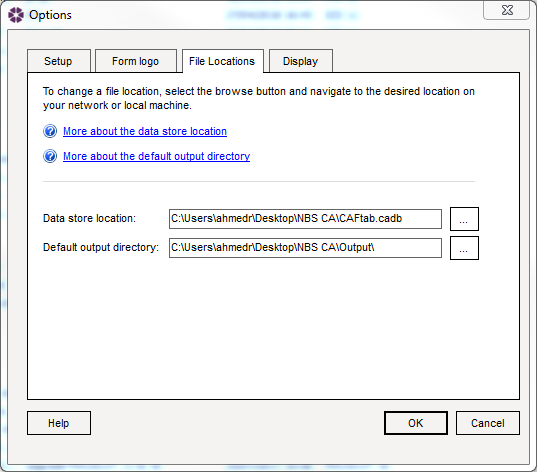
Options > File Locations dialogue box
From here you can select a new location for your Datastore. There must be a CAFtab.cadb file in the location you select. Select OK to close the dialog box.

Latest support articles

Here you will find all you need to know about updates and support for NBS Contract Administrator

Extension of Time certificate not available

Symptoms There is no Extension of Time certificate to select within NBS Contract Administrator under the IC & ICD form of contract.

Overlapping columns in NBS Products

Issue When opening NBS Building, Landscape or Contract Administrator, some of the columns are overlapping and not displaying correctly.

I am unable to see my Jobs in Contract Administrator

Issue When opening NBS Contract Administrator I am not able to see any of my Jobs.