Here you will find all you need to know about updates and support for NBS Contract Administrator
Summary
NBS delivers incremental online updates for NBS Contract Administrator using the NBS online updating mechanism.
More information
Please follow the steps below to apply an online update to NBS Contract Administrator.Please note that online updates must be applied individually to each machine with NBS Contract Administrator installed.
- Log on to the machine with Windows Administrator permissions (contact your IT Administrator for assistance in applying the update if you do not have sufficient permissions).
- Open NBS Contract Administrator from the icon on the desktop or from Start > Programs > NBS > NBS Contract Administrator.
- In the NBS Contract Administrator status bar in the bottom right-hand corner of the screen, a message will be displayed informing you that "Software updates now available".
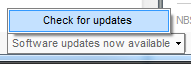
- Clicking on the Check for Updates message will direct you to the NBS website – you will need an Internet connection to download the update.
- Click the Download button and choose Save the file - save this download locally (e.g. Downloads folder or Desktop).
- Unzip the downloaded folder (simply right-click > Extract All. Alternatively you may require a program like WinZip to open compressed files).
- In the extracted folder, double-clicking on Setup.exe. Please ensure NBS Contract Administrator is closed before performing this step.
- In the installation wizard select Next before accepting the Terms and Conditions, enter your information and click Next, leave the Install location defaulted to C:\Program Files (x86)\NBS\ and select Install.
- When the update is complete, select Finish.
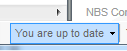
- When you re-open NBS Contract Administrator, the toolbar will inform you that "You are up to date".