Licence Manager reports that the licence file is not stored in the directory where it was installed

Jan 6, 2016 |NBS Software Support

Summary

When a licence is unlocked to a certain location, it is locked to that place and moving it will render it unreadable. If you have moved the licence file, you will be prompted with the following error message upon opening NBS Contract Administrator or NBS Scheduler:
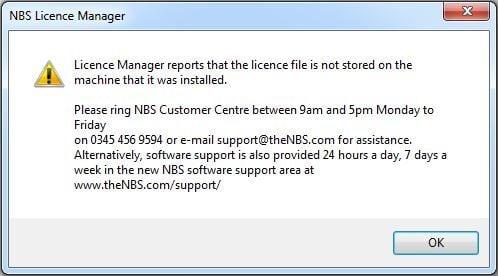
AD0006_01

Solution

To resolve this issue, you need to return the licence file to where it was originally unlocked to.

If you require to move the licence file to a new PC or a new server, follow the links below for the guides to moving your licence file for each program:

NBS Contract Administrator - Moving your licence

NBS Scheduler - Moving your licence

Latest support articles

Here you will find all you need to know about updates and support for NBS Contract Administrator

Extension of Time certificate not available

Symptoms There is no Extension of Time certificate to select within NBS Contract Administrator under the IC & ICD form of contract.

Overlapping columns in NBS Products

Issue When opening NBS Building, Landscape or Contract Administrator, some of the columns are overlapping and not displaying correctly.

I am unable to see my Jobs in Contract Administrator

Issue When opening NBS Contract Administrator I am not able to see any of my Jobs.